In Benin, every business must give its customers a standardised invoice, and customers are required to ask for one. The free MECeF BENIN app, published by Benin's tax authority (Direction générale des Impôts, DGI), lets you check in a few seconds that a standardised invoice is genuine and then report a problem. This guide explains how to use it, whether you live in Benin or are visiting on holiday from Belgium.
At a glance
- Publisher
- Benin's tax authority (Direction générale des Impôts, DGI)
- Price
- Free
- Devices
- Android (Google Play). No iPhone version available at present.
- Without an Android phone
- Check online at sygmef.impots.bj/verification
- Legal basis
- General Tax Code (Code général des impôts), articles 481 to 482 and 502
What is a standardised invoice?
A standardised invoice is an invoice that carries, in addition to the usual details, security features assigned by the DGI: the machine identification number (NIM), the signature and the electronic code, all contained in a QR code. It is issued by a certified electronic invoicing machine (MECeF), an approved invoicing system or its online version, e-MECeF.
The roll-out began in December 2019. The General Tax Code requires a standardised invoice from every business liable for corporation tax, business profits tax, the flat-rate business tax or VAT. It also requires buyers to demand their invoice.
Why check a standardised invoice?
Checking confirms that the invoice is registered with the DGI and that its content matches your purchase: business, date, amount. This is useful for a company justifying its expenses, for an individual who wants to claim under a guarantee, or simply to make sure the tax you paid reaches the tax authority.
A seller who fails to issue a standardised invoice faces a fine of five times the amount not invoiced, with a minimum of 500,000 FCFA per invoice, and more for repeat offences (article 502 of the 2026 General Tax Code).
The standardised invoice prize draw
To encourage consumers to ask for their invoice, the DGI launched a prize draw in June 2020. Invoices are recorded automatically, and the app lets you add them to “Mes factures” (my invoices) to take part. The rules published in 2020 provided for weekly draws of 20,000 to 200,000 FCFA, monthly prizes of 500,000 FCFA and vehicles at the end of the year.
Please note: these rules restrict the draw to consumers living in Benin. A Beninese national living in Belgium therefore cannot take part, even for a purchase made during a stay. We have not found more recent rules: check with the DGI before counting on a prize.
Checking a standardised invoice without the app
MECeF BENIN is only available on Android. With an iPhone or a computer, you can use the DGI's online checking page: sygmef.impots.bj/verification. Enter the MECeF/DGI code and the NIM printed on the invoice to display its details.
Are you a business that has to issue standardised invoices? The e-MECeF platform lets you produce them online. To invest or set up a company in Benin, also read our guide Investing in Benin.
Check a standardised invoice with MECeF BENIN
- 1Ask for your invoiceAt the till, ask for a standardised invoice: it carries a QR code, a NIM and a MECeF/DGI code. Keep it.
- 2Install the app and sign inDownload MECeF BENIN from Google Play, then create an account from the home screen (the “S'inscrire” link, sign up) or sign in.
- 3Scan the QR codeChoose “Scannez et participez” (scan and take part) or the check button, then place the QR code inside the frame. If the code is damaged, type in the invoice code by hand.
- 4Compare with your paper invoiceThe app displays the MECeF/DGI code, the NIM, the date, the business, the invoice type and the amount including tax. Everything must match the receipt you were given.
- 5Report a problemA different amount, an invoice that cannot be found or a seller who refuses to give you one: use the “Signaler” (report) button to file a complaint with the DGI.
Screenshots : MECeF Bénin
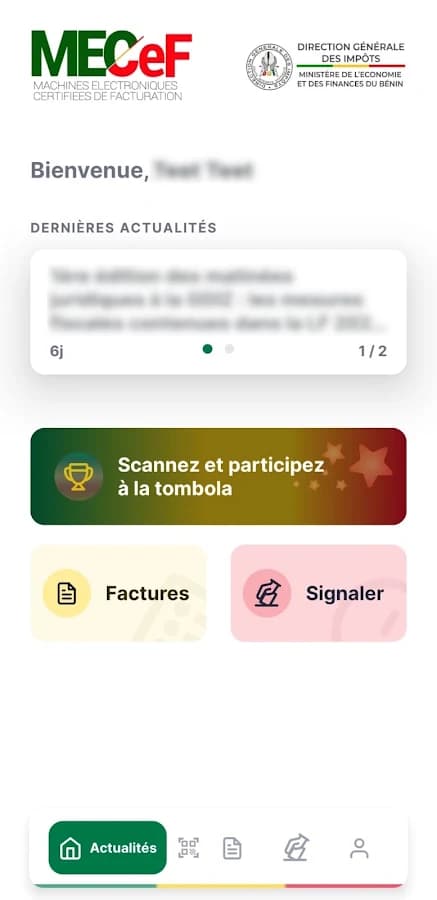
The home screen: DGI news, scanning, invoices and reporting. 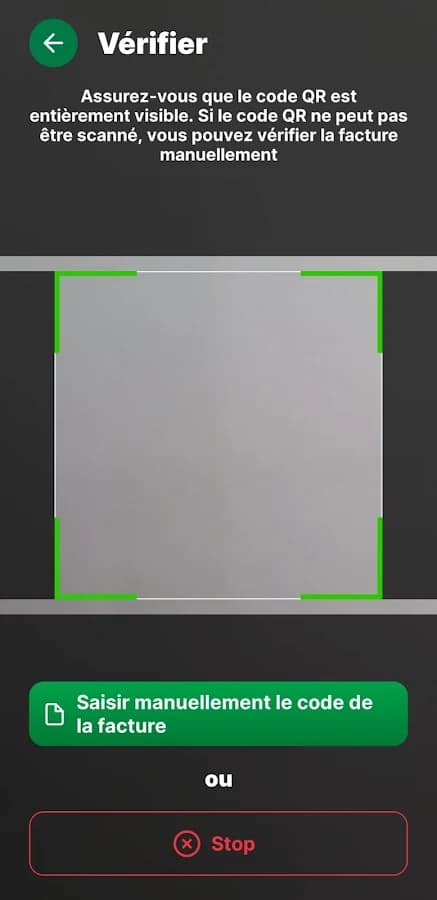
Scanning the QR code, with manual entry as a fallback. 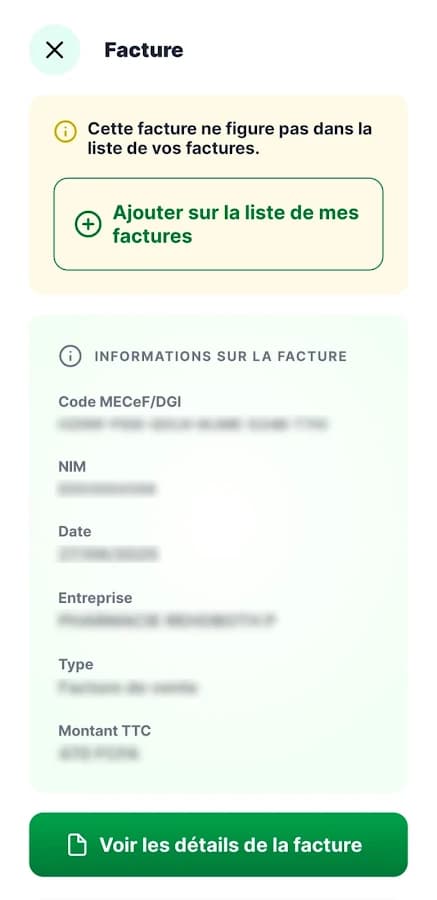
The invoice details, to compare with your receipt. 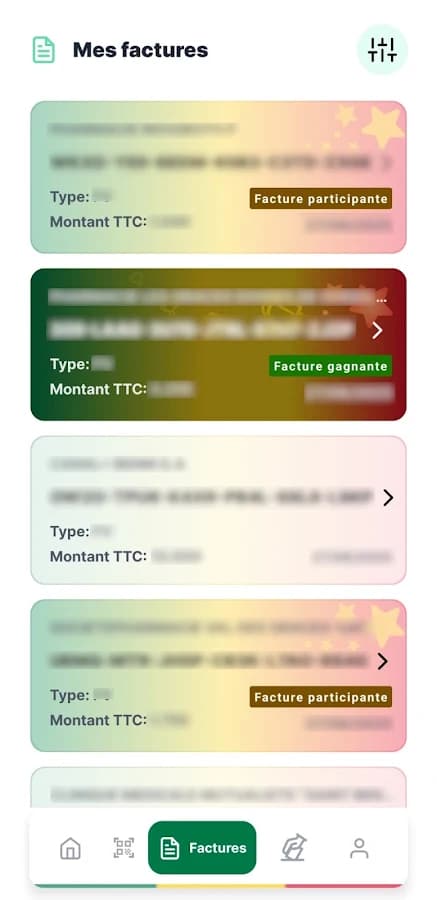
“Mes factures”: your history and the invoices entered in the prize draw.
Screenshot published by Directorate General of Taxes (DGI) on Google Play.
Frequently asked questions
How do I check a standardised invoice in Benin?
Scan its QR code with the MECeF BENIN app (Android), or enter the MECeF/DGI code and the NIM at sygmef.impots.bj/verification. The details displayed must match your invoice.
Is MECeF BENIN available on iPhone?
Not at present: the former App Store listing is no longer available. On an iPhone, use the online check at sygmef.impots.bj/verification.
What if a shopkeeper refuses to give a standardised invoice?
The law requires them to give it to you and requires you to ask for it. You can report them to the DGI with the app's “Signaler” (report) button. The seller faces a fine of at least 500,000 FCFA per invoice not issued.
Can I take part in the prize draw from Belgium?
No, according to the rules published in 2020: the prize draw is restricted to consumers living in Benin. We have not found more recent rules.
Can a business issue standardised invoices without a machine?
Yes, with e-MECeF, the online version of the certified machine, available at e-mecef.impots.bj after registering with the DGI.
Sources
- Fiche Google Play de MECeF BENIN (DGI)
- Gouvernement du Bénin : tout savoir sur les factures normalisées
- Gouvernement du Bénin : jeu tombola des factures normalisées
- DGI : vérification d'une facture normalisée en ligne
- DGI : plateforme e-MECeF
- Code général des impôts 2025 (finances.bj)
Guide checked in October 2026. The consulate does not publish any of these apps. For questions about how they work, contact the body that publishes them.